 Video Player by bPlugins
 Custom Spacing & Corners
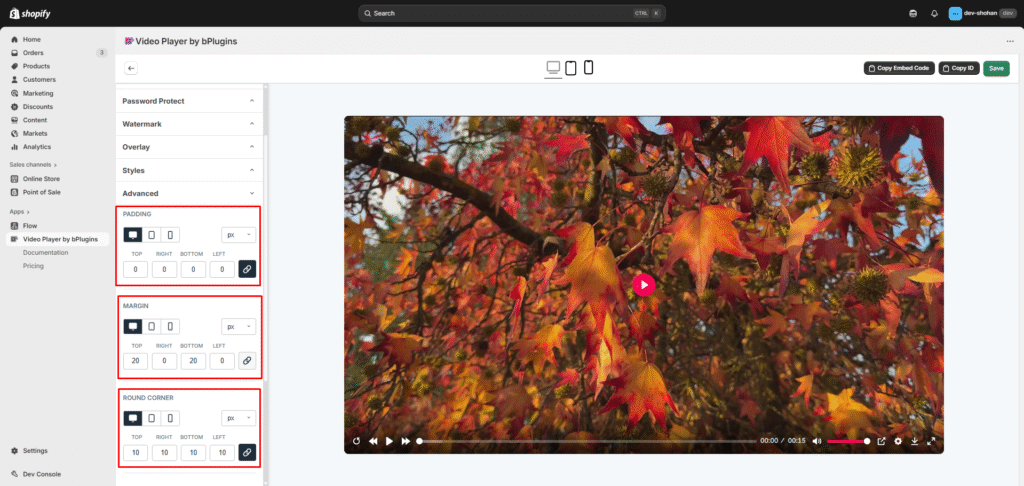
You can customize the video’s padding, margin, and corner style for different devices.
- Enable Custom Styling
Turn on the option to modify spacing and corners. - Select Device Type
Choose the device you want to style: Desktop, Tablet, or Mobile. - Choose Unit Type
Select your preferred unit (e.g., px, %, rem). - Set Padding & Margin
Enter the custom padding and margin values for the selected device. - Adjust Corner Radius
Add or update the Border Radius to create rounded corners on your video.
This helps you maintain perfect spacing and a smooth, rounded design across all screen sizes.
Custom Width & Video Ratio
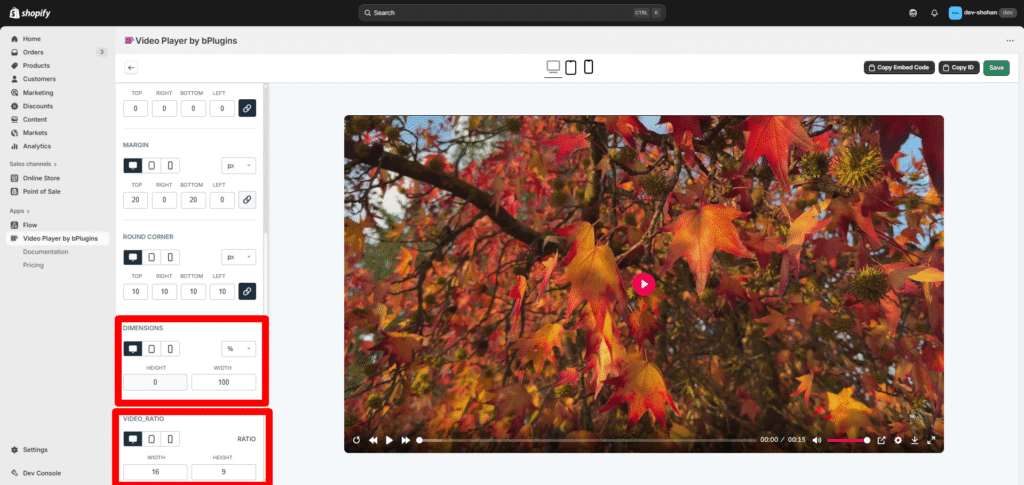
You can set different video widths and aspect ratios for each device type to ensure the best viewing experience.
- Enable Custom Width & Ratio
Turn on the option to customize video width and aspect ratio. - Select Device Type
Choose which device you want to configure: Desktop, Tablet, or Mobile. - Set Custom Width
Enter a custom width value for the selected device (e.g., px, %, rem). - Adjust Video Ratio
Choose or set a custom aspect ratio (e.g., 16:9, 4:3, 1:1) based on the screen size.
With this feature, you can tailor video size and proportions to look perfect across different devices and display sizes.