
Grid / Layout Settings
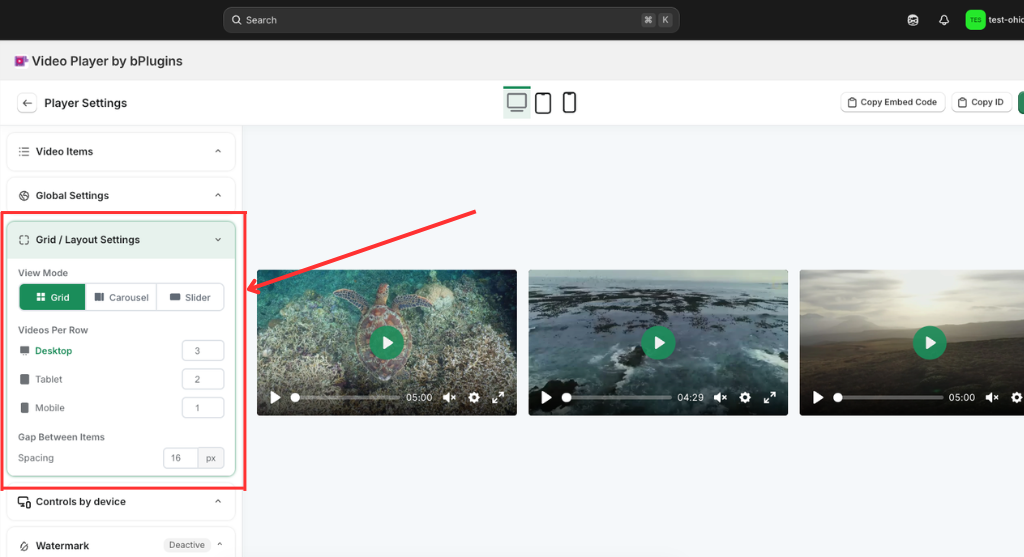
The Grid / Layout Settings provide full control over the visual arrangement of your video collection to ensure it fits perfectly within your site’s design.
- Versatile View Modes: Choose between a static Grid, a dynamic Carousel, or a smooth Slider to define how users interact with and browse your video content.
- Responsive Column Control: Customize the Videos Per Row for Desktop, Tablet, and Mobile independently (e.g., 3-2-1) to maintain a professional look across all screen sizes.
- Precision Spacing: Use the Gap Between Items setting to adjust the pixel-perfect spacing between videos, preventing a cluttered interface.
- Real-time Alignment: The live preview immediately reflects layout changes, allowing you to balance content density and readability on the fly.
Was this page helpful?